Information Visualization | Responsive Web
Visualizing the regulatory process
Vax
Helping people understand where they are in the regulatory process and get the right documents.
Creating an accessible and modern immunization registry.
ROLE
UX Research, Ideation, Wireframe, Prototyping, User Testing, Visual Design, Developer handoff, QA testing
UX Research, Ideation, Wireframe, Prototyping, User Testing, Visual Design
Team
1 UX Designers, 1 Product Managers, 5 Developers, 2 Business Analysts
Individual 4th Year Thesis
TOOLS
TOOLS
Figma, DevOps
Sketch, Illustrator, InVision, Principle
DURATION
6 months
September 2017 - April 2018 (8 months)
Overview
Overview
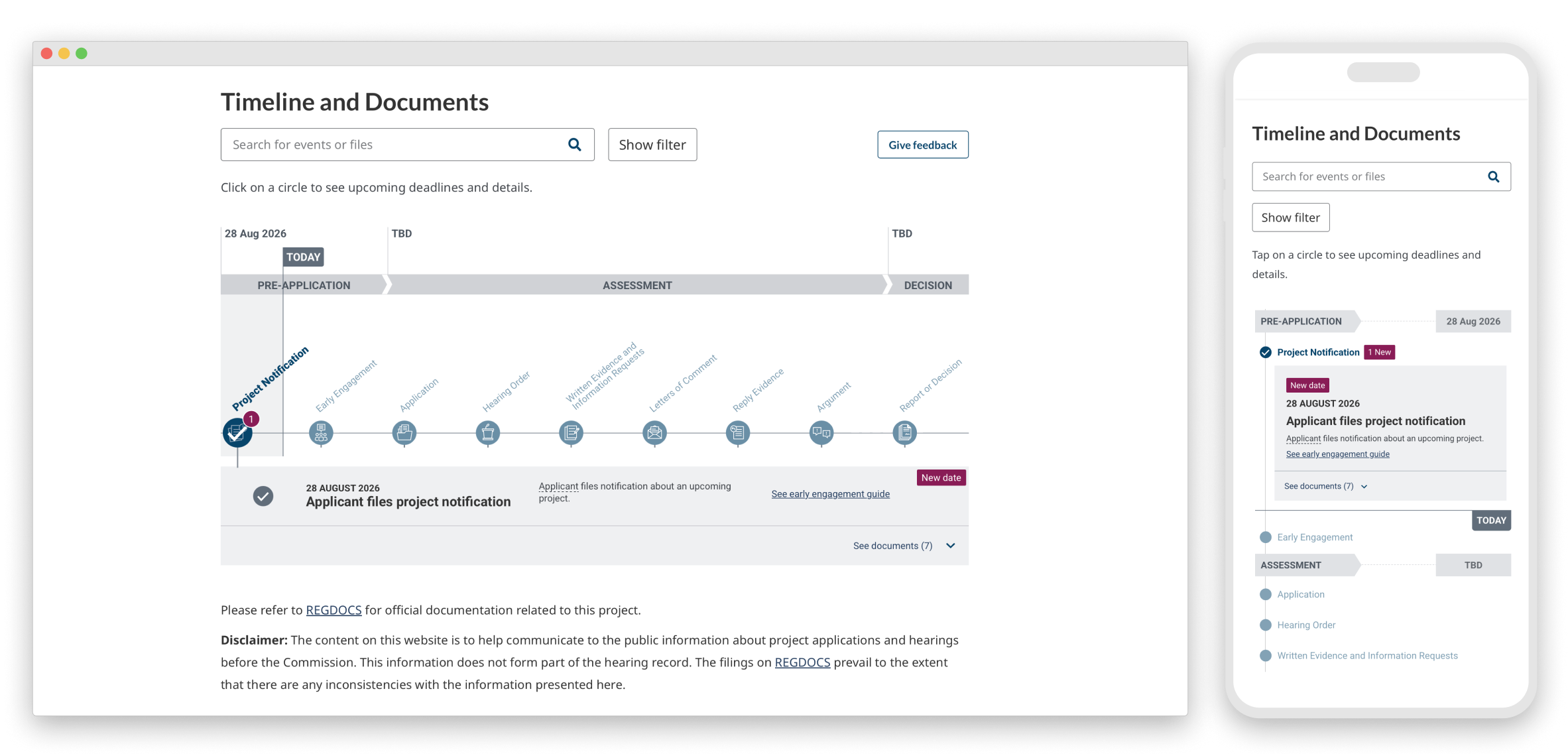
Before a federally regulated energy project is built, a company must apply to the Canada Energy Regulator. They will assess the potential impact of a project on local communities and the environment by holding a public hearing.
Vax was my fourth-year thesis project inspired by a personal struggle to find my immunization record after getting cut by metal. I decided to dig deeper into the problem space to see if it is a broader public issue.
Problem
Problem
The hearing information layout is content heavy and difficult to scan. As a result, this makes it difficult for participants to compare information, dates and understand all the steps they need to take.
In Canada, there are no universal methods for people to keep track of the vaccinations they have received. The current paper-based system means individuals have to update their immunization records on their own. Each municipality also has its own platform for residences to note their child's vaccination history.
User goals
Why is this an issue?
- See an overview of the hearing process
- See where the project is in the process
- Understand what they need to do
- Know when they need to do them by
- Easily find guidance like templates to help them get their tasks done
- Immunization records are easily lost.
- People do not always keep paper records up to date.
- Can lead to potential inaccuracies in public health data.
- Causes a lack of clarity in Canada's immunization rates.
- If an infectious outbreak occurs, healthcare providers may not be able to properly assess the risk of certain populations and locations.
Phase 1 role
Challenge
- Ideation of desktop designs and mobile designs
- Supported with user research
- Collaborating with developers QA testing
How might we design an accessible and accurate system that allows people to track their immunization records?
How might we promote the usage of a digital system and inform people of vaccinations they need?
Phase 2 role
Challenge
- Full ownership on new timeline features like glossary, new tags and documents section
- A/B testing and user testing design options
- Collaborating with developers and QA testing
How might we design an accessible and accurate system that allows people to track their immunization records?
How might we promote the usage of a digital system and inform people of vaccinations they need?
Challenge 1
Research
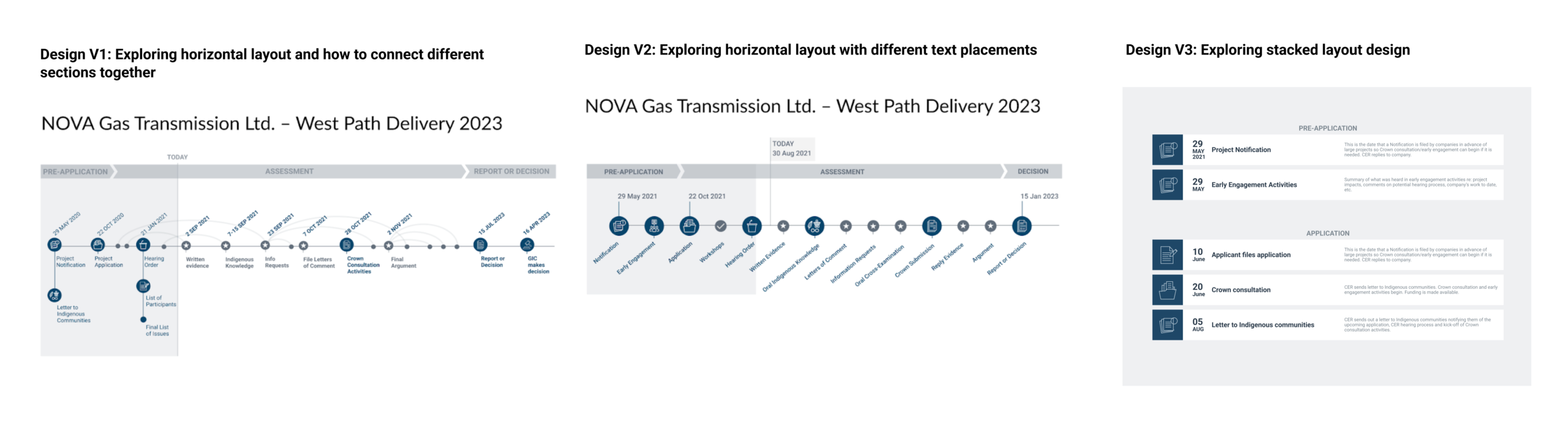
From the conducted user research sessions, 5/5 users found it difficult to get an overview of what the hearing process looks like. I explored some ways to address that problem.
Challenge 2
Research
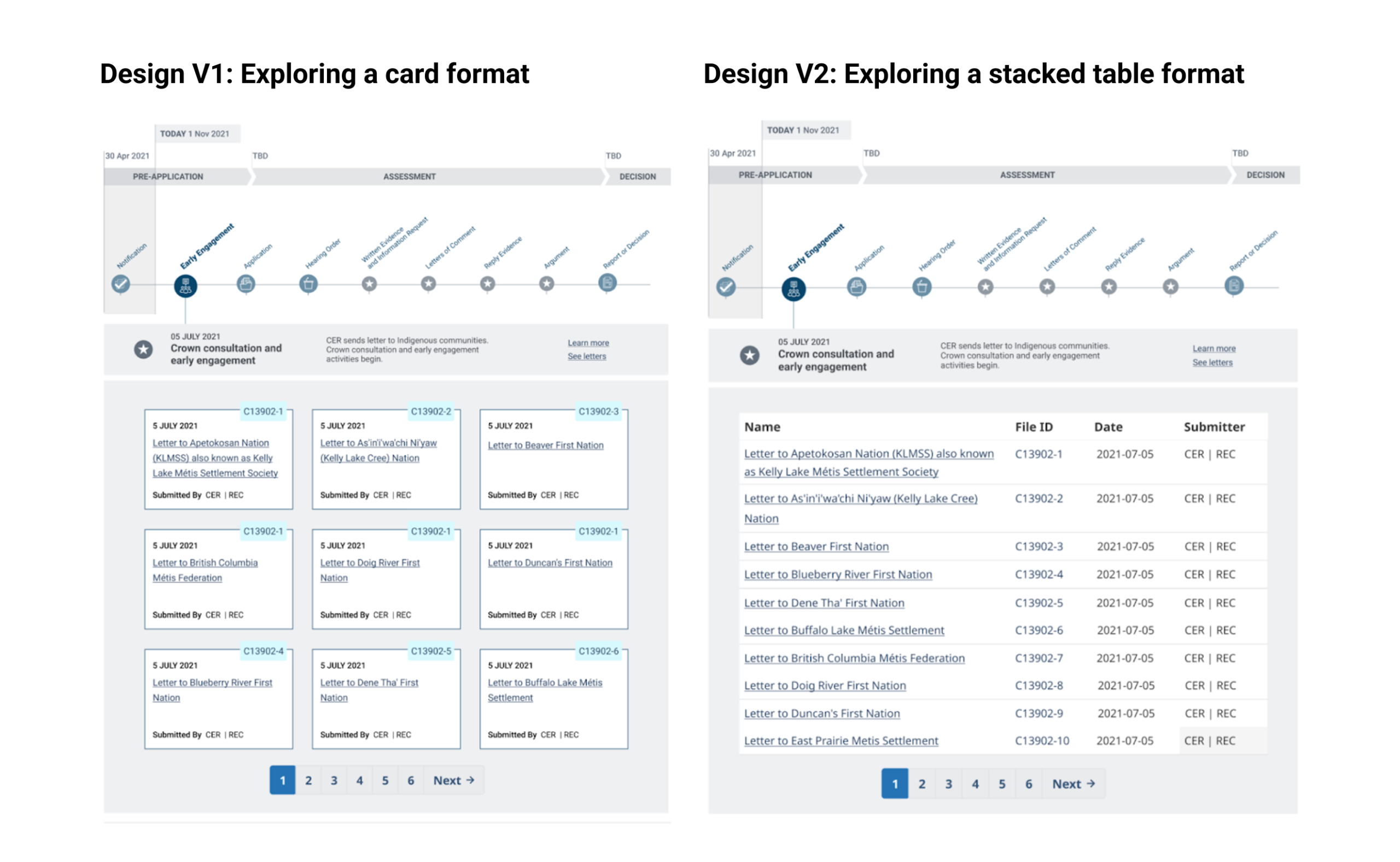
As a result of the user research, we discovered participants found it frustrating to access documents in different parts of the government website. I explored a card and stacked table format. Further testing led to version two being easier than version one to search and scan for the items that users needed.
Challenge 3
Research
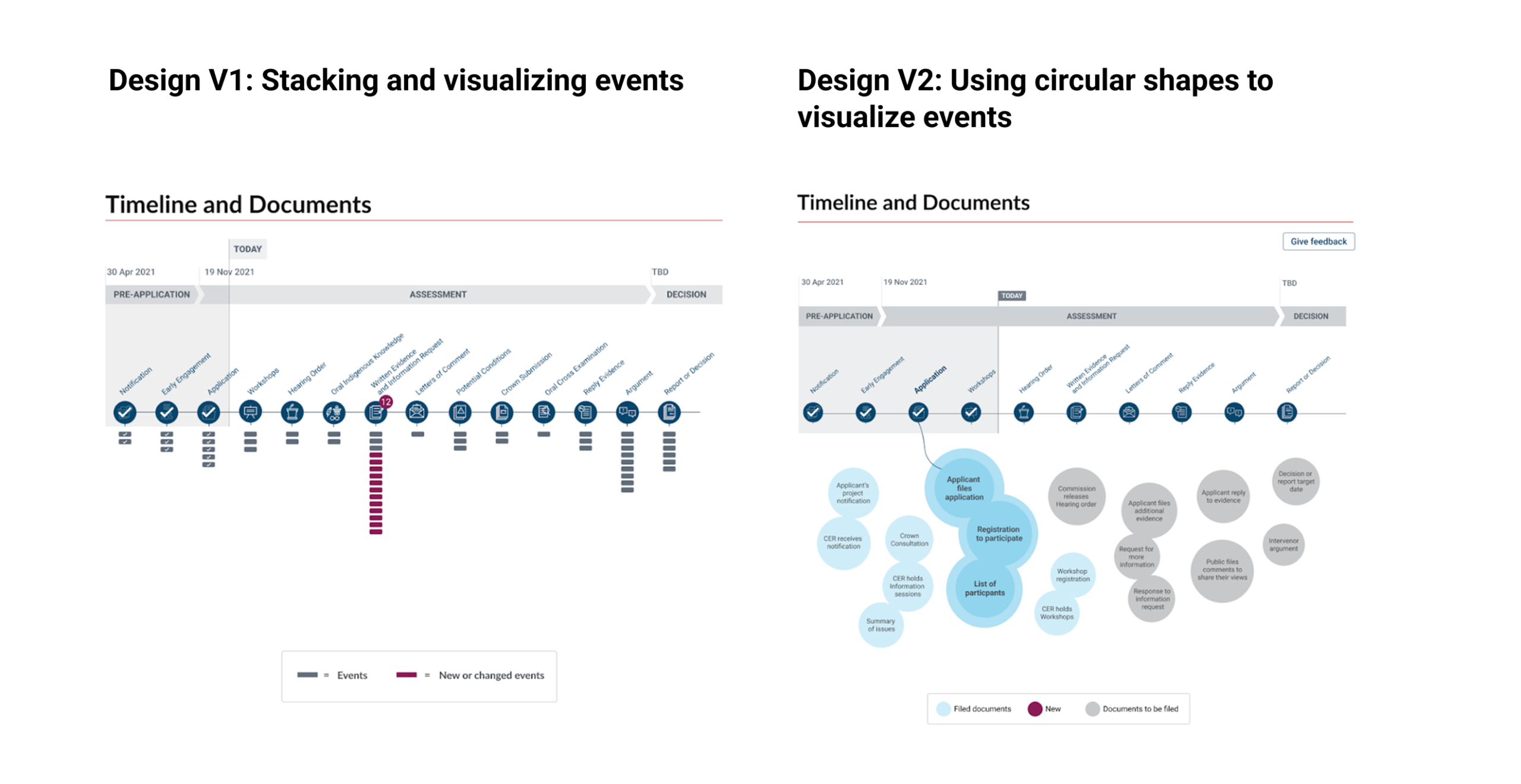
4 ouf of 5 users did not know that they can select the circles to view more details. I explored ways to inform users of the information within each milestone and create an affordance to indicate that. Ultimately, we did not go with any of the two directions because of the complexity of development and it did not translate well into mobile view.
Responsive design
Primary Research
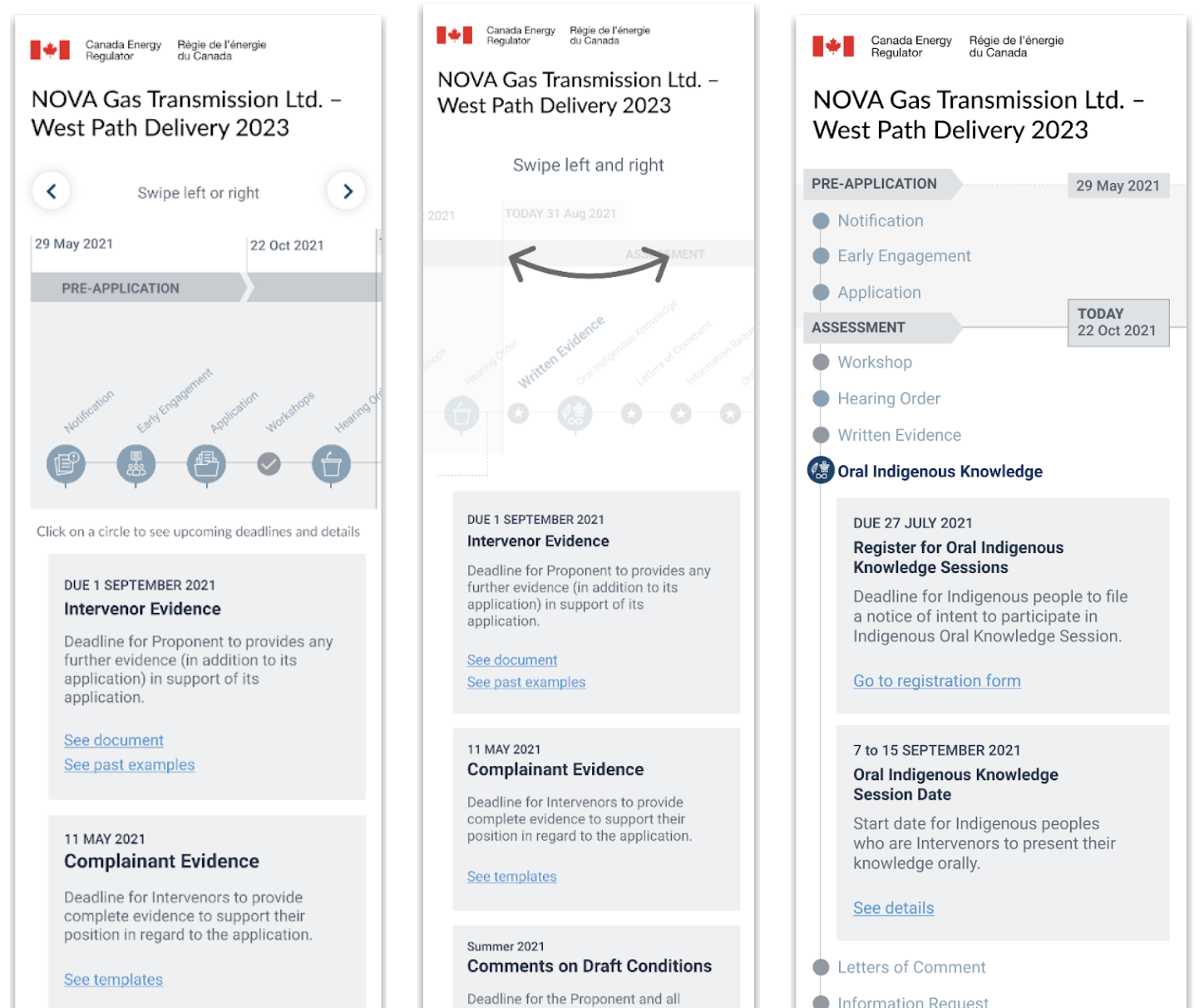
I also explored different mobile design concepts. This including the ability to keep the existing timeline to scroll vertically and horizontally. I also looked at showing the users how to navigate the mobile screen. Finally I explored a vertical scroll only option.
I conducted four 1-1 interviews with two people working in public health (one doctor and one nurse) and two potential end-users of a digital immunization registry (parents and travellers).
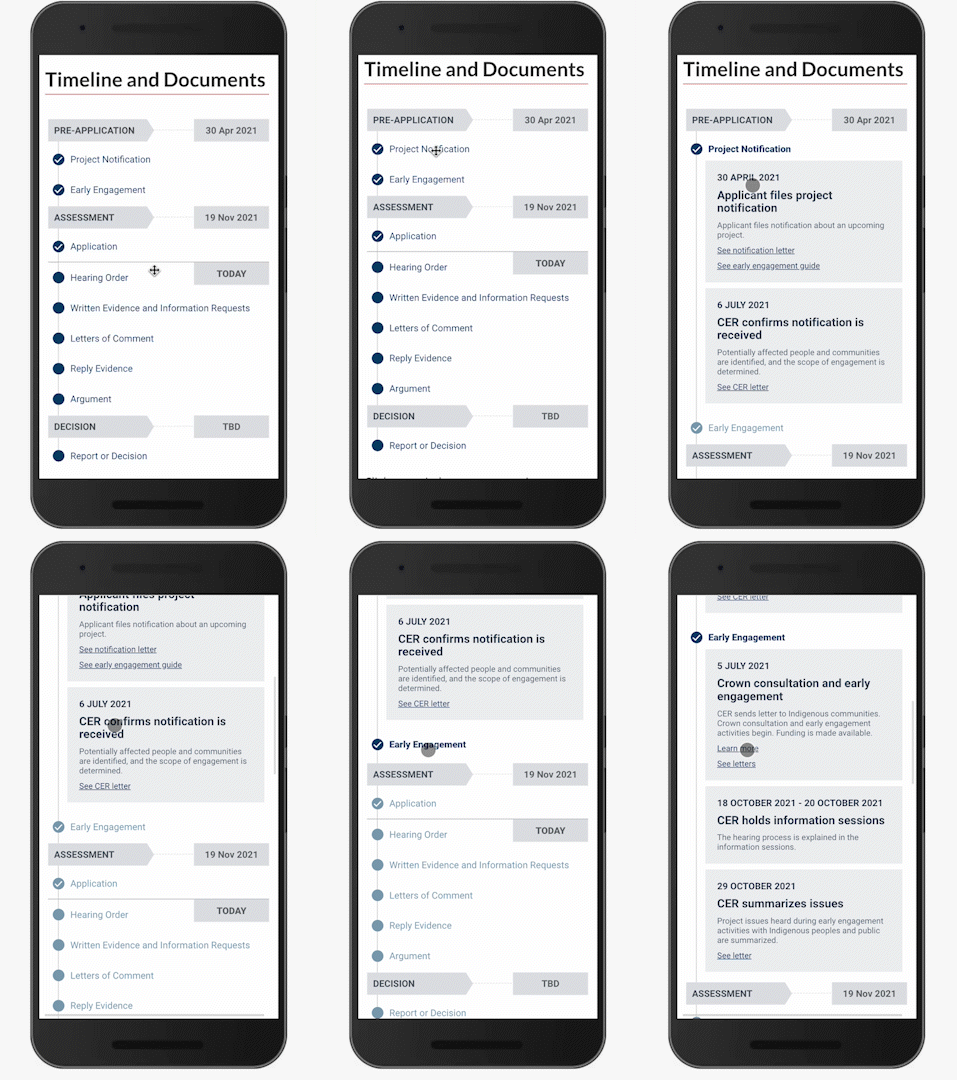
Mobile design final view
Travel
Through feedback, I went with option 3 as the final design because it was the most intuitive for users to navigate and it allowed them to see a lot of information all at once.
In this section, it will ask the visitor if they are travelling within the next 12 months. If they answer yes, more specific questions will show up. This includes where their travel destination is and when they are departing.
Results
Results
Over 50% of people who landed on the web application engaged with it.
Based on the user's answers, it will show the recommended and suggested vaccinations they need.
See the design in action
Prototype
Learning
Reflection
- Sacrificing future speed for current speed incurs a lot of design debt. It is important to start componentizing when you get close to the final design.
Building checklists help to reduce redundancies and the need to go back and forth with developers during QA testing.